MotorData

Professional

MotorData Professional: Automotive Diagnostic Software for Workshops in Kazakhstan

Interactive wiring diagrams, diagnostic trouble code data, ECU pinouts and component locations for car repair shops, auto electricians and diagnostic technicians. Cloud access from any computer, license paid in Kazakhstani tenge.

What MotorData Professional Is

MotorData Professional is a cloud-based technical information system for vehicle diagnostics, servicing and repair.

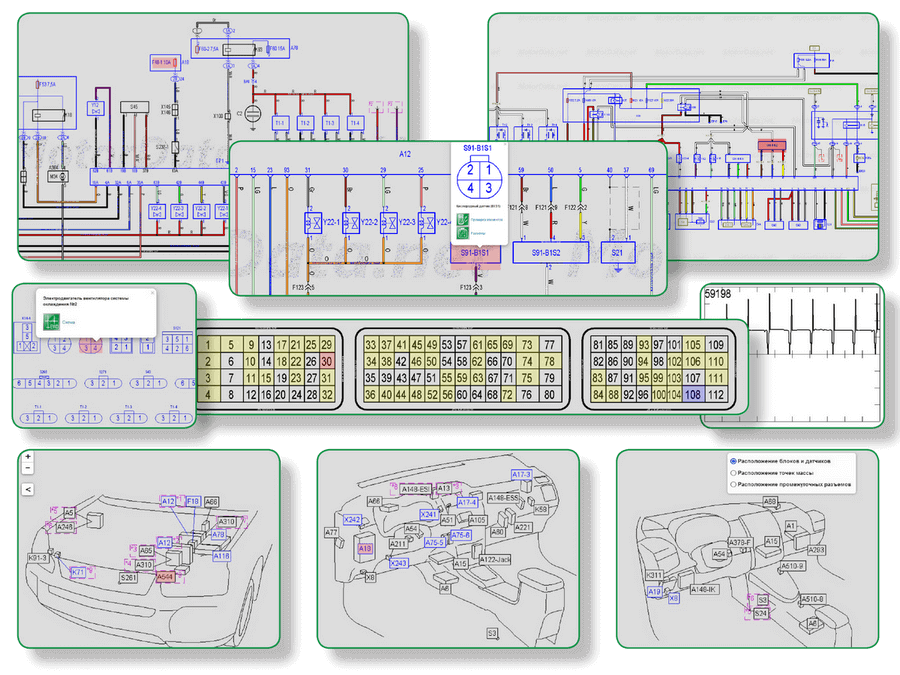
The system provides the reference data a technician needs to interpret diagnostic results and narrow down the probable cause of a fault. Depending on the make, model, production year, engine and trim level, it can provide interactive wiring diagrams, diagnostic trouble code descriptions, ECU pinouts, component locations and component test procedures.

MotorData Professional runs in a web browser. There is nothing heavy to install on the workshop computer — you need an account, an active license and a stable internet connection. It works on Windows 10 and 11 and on macOS, on desktops, laptops and compatible tablets.

20,000 interactive wiring diagrams ·60,000 diagnostic trouble codes ·4,500 ECU pinouts

MotorData Professional empowers auto electricians to master their craft.

Who It Is For

01

Car repair shops and service stations

One system covers technical information across a multi-brand workshop: wiring diagrams, DTCs, pinouts and component locations for supported vehicles. Used for electrical diagnostics, wiring checks, work on electronic control units and repair preparation. If several technicians need access at the same time, the number of users must be taken into account when choosing a license.

03

Installers of additional equipment

Alarm systems, immobilizer bypass work, LPG equipment, audio and auxiliary electronics — all require accurate wiring, connector and ground point information for the specific vehicle rather than a generic diagram.

02

Auto electricians and diagnostic technicians

For specialists who need wiring diagrams, ECU pinouts, fuse and relay data, component locations and trouble code descriptions on a daily basis. Before buying, check that the makes and models you see most often are covered.

04

Colleges and training centers

The system can be used to teach wiring diagram reading, DTC interpretation and structured diagnostics of vehicle electronic systems. Terms for educational institutions are agreed separately with a manager.

What Is Inside

Interactive Wiring Diagrams

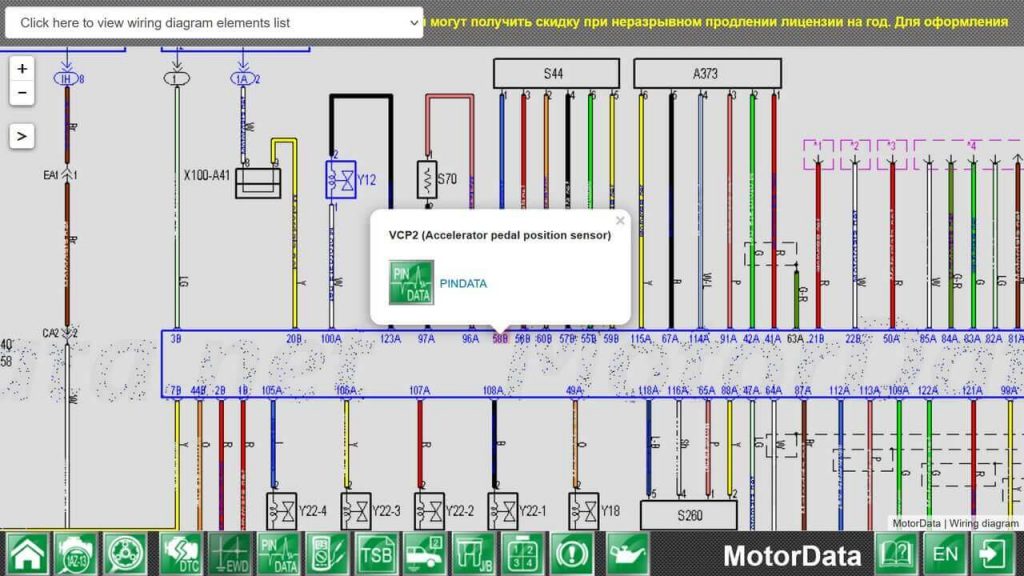
Color interactive diagrams show how control units, sensors, actuators, fuses, relays, connectors and ground points are connected. Clicking a wire traces the circuit, so instead of studying the whole sheet you work only with the circuit that belongs to the system you are diagnosing.

This is what makes the difference when you are looking for an open circuit, a short, a missing supply or an incorrect signal. Diagrams may also carry connector, terminal, control unit, sensor and actuator details. The exact content depends on the vehicle.

Engine management system, CHEVROLET Aveo 5 Wiring diagram

Diagnostic Trouble Codes (DTC)

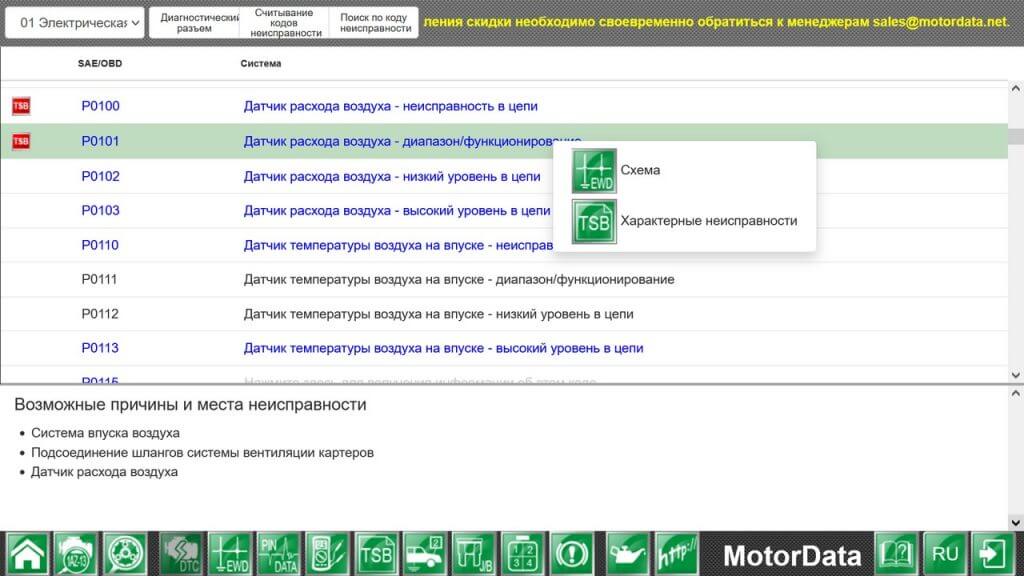
MotorData Professional helps you move from the code your scan tool reported to the actual check you need to perform. The database covers generic and manufacturer-specific OBD-II codes (P0, P1, P2, P3, U0, U1, U2, C and B groups), as well as flash codes and hexadecimal codes.

For a supported vehicle, code information may include the description, the conditions under which the code sets, possible causes, the components involved, test procedures and reference values, plus links to the relevant wiring diagram and ECU pinout.

Model/system selection  2

ECU Pinouts and Vehicle Connectors

A pinout shows the function of each terminal on a control unit or component. You need it to check supply, ground, signal lines and wiring integrity — it tells you exactly where to place the multimeter or oscilloscope probe instead of hunting for terminal functions in third-party sources.

The database contains pinouts for control units, sensor connectors, actuators and other elements of vehicle systems, with reference waveforms and voltage levels where available.

image 20

Component Locations

Location diagrams help you find control units, sensors, relays, fuses, connectors and ground points on the car. Combined with fuse and relay box data, this shortens the physical search, which on modern vehicles often takes longer than the electrical measurement itself.

Additional Reference Data

Depending on coverage, the system also provides technical service bulletins and known model-specific faults, component test and initialization procedures, fluid capacities and oil specifications for more than 1,500 models, and a searchable knowledge base of around 700 professional articles.

The scope of technical information varies by make, model, year, engine and trim level. We recommend checking the sections you need for the vehicles you actually service before buying a license.

→See all features

motordata components and ground 1 1

Vehicle Coverage

The database covers more than 600 models from leading manufacturers, with a focus on the makes most common in Kazakhstan and Central Asia: Japanese, Korean, Chinese and Russian vehicles, along with a number of European models.

Chinese brands include Chery, BYD, Geely and Great Wall. Russian brands include Lada, GAZ and UAZ, plus Renault.

One important caveat. A make being present in the database does not mean every model has the same depth of information. Coverage depends on the production year, engine, trim level and vehicle system. For one car you may find wiring diagrams, DTCs and pinouts; for another, only certain sections.

→ Check a specific vehicle in the model catalog

How It Is Used in Practice

MotorData Professional is a technical information system. It does not connect to the vehicle and does not replace a diagnostic scan tool. It is used alongside your existing equipment: scan tools, oscilloscopes, multimeters and other electrical test instruments.

A typical sequence looks like this. The scan tool reports a fault code in a vehicle’s electrical system. In MotorData Professional the technician opens the code description and its possible causes, moves to the wiring diagram for that circuit, checks the ECU pinout to identify the terminals to measure, looks up where the component and its connector are physically located, and follows the test procedure. The result is a measurement plan instead of guesswork and parts replaced on a hunch.

MotorData Professional at a Glance

ParameterMotorData Professional
PurposeTechnical information for vehicle diagnostics and repair
FormatCloud system, accessed through a web browser
Core contentWiring diagrams, DTCs, ECU pinouts, component locations
Connection to the vehicleDoes not connect directly
EquipmentUsed together with a scan tool and measuring instruments
Operating systemsWindows 10 and 11, macOS
Purchase in KazakhstanThrough an official reseller
Payment currencyKazakhstani tenge (KZT)
SupportAssistance with plan selection, payment and license activation

Buying MotorData Professional in Kazakhstan

Choose a plan on the pricing page and place your order. If you are not sure which option fits your work, contact a manager and tell us which vehicles you service and how many specialists will use the system.

Buying through the Kazakhstan reseller means you pay in tenge and can get help in your own time zone with plan selection, payment, account registration, license activation and getting started. Organizations and educational institutions should confirm payment terms and document requirements before purchase.

A legitimate license gives you access to the current version of MotorData Professional and official support under the terms of your plan.

Before you commit to a longer subscription, we recommend a short trial period to check coverage on the cars that actually come into your shop.

See Prices in KZT

MotorData Professional and MotorData OBD2: What Is the Difference

These are two different MotorData products built for different jobs.

Электросхема 4 3 1

MotorData Professional is a cloud technical information system for workshops, auto electricians and diagnostic technicians. It contains wiring diagrams, DTC data, pinouts, component locations and other professional reference material. It does not connect to the vehicle and is used together with diagnostic equipment.

MotorData App Eng 2

MotorData OBD2 is a mobile app that connects to a car through a compatible ELM327 adapter. It reads and clears trouble codes, displays live parameters and performs the diagnostic functions available on supported vehicles.

If you need wiring diagrams, pinouts and professional repair information, choose MotorData Professional. If you need a mobile app that connects to the car through an ELM327 adapter, look at MotorData OBD2. Many workshops use both.

Choose MotorData Professional · Learn About MotorData OBD2

FAQ

A cloud-based technical information system for vehicle diagnostics and repair. It contains wiring diagrams, diagnostic trouble code data, ECU pinouts, component locations and other reference material for supported vehicles.

No. A scan tool reads information from the vehicle's electronic control units. MotorData Professional supplies the data you need to interpret that information: DTC descriptions, wiring diagrams, pinouts and component locations.

No. The system runs online in a supported browser. You need an account, an active license and a stable internet connection.

Yes. When you buy through the Kazakhstan reseller, the order is paid in Kazakhstani tenge.

Yes. When several specialists need access, the number of users should be taken into account when choosing a plan. We recommend starting with a short access period to evaluate the system.

Yes. The system can be used to teach wiring diagram reading, DTC interpretation and structured diagnostics. Terms for educational institutions are agreed with a manager.

More than 600 models from Japanese, Korean, Chinese, Russian and European manufacturers. Coverage depends on the year, engine, trim level and vehicle system, so check the specific vehicle in the model catalog before buying.

Yes, the MotorData Professional software is regularly extended with new technical material. Actual coverage for a specific vehicle should always be verified in the catalog.

It is a cloud based software and is used by workshops and specialists in more than 100 countries. Purchase, payment and support terms for customers in other countries should be confirmed with a manager.

A computer or tablet with internet access, and your usual diagnostic equipment: a scan tool, a multimeter and, for signal analysis, an oscilloscope.

Get MotorData Professional in Kazakhstan

Interactive wiring diagrams, DTC data, ECU pinouts and component locations — the reference layer your technicians need between the scan tool and the repair.

Pay in tenge and get local assistance with plan selection, payment and activation.

See Prices in KZT · Check the Model Catalog